CI Integration
GitHub Action
The GitHub Action installs skillsaw, runs it, and prints violations in the CI log. A separate review action posts violations as inline PR comments with automatic deduplication and thread resolution.
Basic usage (lint only)
name: Lint

on: [pull_request]

permissions:
  contents: read

jobs:
  skillsaw:
    runs-on: ubuntu-latest
    steps:
      - uses: actions/checkout@v5
        with:
          persist-credentials: false
      - uses: stbenjam/skillsaw@v0
        with:
          strict: true
With PR review comments
To post inline comments on PRs (including fork PRs), use the two-workflow pattern. The lint workflow runs with read-only permissions and uploads the report as an artifact. A second workflow triggers on completion and posts comments with write permissions — without ever checking out untrusted code.
# .github/workflows/lint.yml
name: Lint

on:
  pull_request:
  push:
    branches: [main]

# SECURITY: This workflow runs on untrusted PR code, so it has read-only
# permissions. It cannot post comments — that's handled by lint-review.yml.
permissions:
  contents: read

jobs:
  skillsaw:
    runs-on: ubuntu-latest
    steps:
      - uses: actions/checkout@v5
        with:
          persist-credentials: false
      - uses: stbenjam/skillsaw@v0
        with:
          strict: true
# .github/workflows/lint-review.yml
name: Lint Review

# SECURITY: workflow_run triggers run in the context of the BASE branch (main),
# not the PR branch. This workflow never checks out or executes untrusted PR
# code — it only downloads the lint report artifact produced by the Lint
# workflow and posts review comments. This is GitHub's recommended pattern for
# safely granting write permissions to PR feedback workflows.
# See: https://docs.github.com/en/actions/writing-workflows/choosing-when-your-workflow-runs/events-that-trigger-workflows#workflow_run
on:
  workflow_run:
    workflows: ["Lint"]
    types: [completed]

jobs:
  review:
    # Only run for pull requests, not push events.
    if: github.event.workflow_run.event == 'pull_request'
    runs-on: ubuntu-latest
    permissions:
      pull-requests: write
    steps:
      # Reads the lint report artifact from the Lint workflow and posts inline
      # PR comments. Does not run skillsaw or execute any PR code.
      - uses: stbenjam/skillsaw/review@v0
The review action assumes its token posts as github-actions[bot]. When using
a GitHub App or PAT, set comment-author to that token's login so subsequent
runs can update and remove only the comments they own:
- uses: stbenjam/skillsaw/review@v0
  with:
    token: ${{ secrets.REVIEW_APP_TOKEN }}
    comment-author: skillsaw-reviewer[bot]
Inputs
| Input | Description | Default |
|---|---|---|
path |
Path to lint | . |
version |
PyPI version to install; empty installs the action checkout | '' |
strict |
Treat warnings as errors | false |
fail-on |
Fail on violations at this severity or above (error, warning, info); strict: true is equivalent to fail-on: warning, and combining strict with a contradictory fail-on fails the run |
'' |
verbose |
Include info-level violations | false |
no-custom-rules |
Skip custom rules defined in .skillsaw.yaml |
true |
plugins |
Trusted newline-separated pip requirements to install as rule plugins; values can select indexes or URLs | '' |
With version left empty, the linter comes from the same tag or commit SHA
as the action. Set version to install a specific PyPI release instead:
Outputs
| Output | Description |
|---|---|
exit-code |
skillsaw exit code (0=pass, 1=violations at or above the fail-on threshold, 2=usage error) |
errors |
Number of errors found |
warnings |
Number of warnings found |
report-file |
Path to JSON report file |
Supply Chain Protection
The examples above use @v0 for brevity. For supply-chain protection,
replace @v0 with a pinned commit SHA:
While this project follows current best practices — PyPI trusted provenance, 2FA, signed releases — pinning to a SHA prevents a compromised tag from injecting malicious code into your workflow. Find the current SHA for a tag with:
PR comment behavior
- Each violation gets its own inline comment on the relevant line or file
- Comments are deduplicated across re-runs using fingerprints that include the source line. Upgrading from an older action may repost existing comments once as the new fingerprints take effect.
- When a violation is fixed, its unreplied review comment is deleted
- Comments with human replies are preserved
The repository's privileged PR follow-up agent does not reply to or resolve inline review threads directly. It posts at most one PR-level summary naming the inline comments it handled, leaving thread resolution to a collaborator.
External link checking
External URL availability depends on third-party servers and is outside skillsaw's deterministic lint scope. Use a dedicated link checker on a schedule instead of making remote availability a pull-request gate. For GitHub Actions, Lychee provides a maintained checker with Markdown-aware extraction, retries, exclusions, and job summaries.
name: Link Check

on:
  workflow_dispatch:
  schedule:
    - cron: '17 7 * * 1'

permissions:
  contents: read

concurrency:
  group: link-check
  cancel-in-progress: false

jobs:
  links:
    runs-on: ubuntu-latest
    timeout-minutes: 15
    steps:
      - uses: actions/checkout@v5
        with:
          persist-credentials: false
      - uses: lycheeverse/lychee-action@v2
        with:
          args: >-
            --no-progress
            --exclude-all-private
            --root-dir .
            './**/*.md'
          fail: true
          jobSummary: true
Pin both Actions to commit SHAs in a real workflow. Resolve the current Lychee v2 SHA with:
Badge and report card
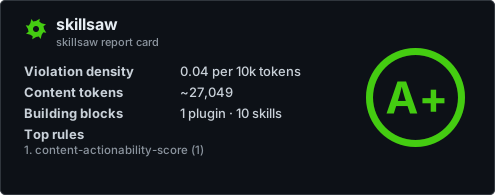
skillsaw badge writes .skillsaw-badge.json (a shields.io endpoint
payload) and prints ready-to-paste README markdown. Add --large to also
render .skillsaw-card.svg — a self-contained SVG card with the repository
name and letter grade (--theme light|dark, default dark):
Regenerate both on pushes to your default branch and commit them when they change:
name: Badge

on:
  push:
    branches: [main]

permissions:
  contents: write

jobs:
  badge:
    runs-on: ubuntu-latest
    steps:
      - uses: actions/checkout@v5
      - run: pipx install skillsaw
      - run: skillsaw badge --large .  # grades, never gates (always exits 0)
      - name: Commit badge artifacts
        run: |
          git config user.name "github-actions[bot]"
          git config user.email "github-actions[bot]@users.noreply.github.com"
          git add .skillsaw-badge.json .skillsaw-card.svg
          git diff --cached --quiet || git commit -m "Update skillsaw badge"
          git push
Both images are served from your repository via
raw.githubusercontent.com. GitHub proxies README images through its
camo cache, which caches aggressively — a freshly regenerated badge or
card can appear stale for a while after pushing.
Other output formats
skillsaw supports several machine-readable output formats — --format
(stdout) and --output (file) accept text, json, sarif, html,
code-climate, and gitlab — including SARIF
2.1.0 for tools that ingest it.
See the CLI reference for details.
Quiet logs
skillsaw lint --quiet (-q) keeps CI logs short. A clean run prints
nothing to stdout. A run with findings prints the findings and the summary
without the banner or scan stats. The flag changes only the text report on
stdout, so files requested with --output are written in full and the exit
code is unchanged:
GitLab CI
For GitLab merge-request widgets, use the gitlab output format (a Code
Quality report, available since skillsaw 0.11.3):