CI Integration
GitHub Action
The GitHub Action installs skillsaw, runs it, and prints violations in the CI log. A separate review action posts violations as inline PR comments with automatic deduplication and thread resolution.
Basic usage (lint only)
name: Lint

on: [pull_request]

permissions:
  contents: read

jobs:
  skillsaw:
    runs-on: ubuntu-latest
    steps:
      - uses: actions/checkout@v5
        with:
          persist-credentials: false
      - uses: stbenjam/skillsaw@v0
        with:
          strict: true
With PR review comments
To post inline comments on PRs (including fork PRs), use the two-workflow pattern. The lint workflow runs with read-only permissions and uploads the report as an artifact. A second workflow triggers on completion and posts comments with write permissions — without ever checking out untrusted code.
# .github/workflows/lint.yml
name: Lint

on:
  pull_request:
  push:
    branches: [main]

# SECURITY: This workflow runs on untrusted PR code, so it has read-only
# permissions. It cannot post comments — that's handled by lint-review.yml.
permissions:
  contents: read

jobs:
  skillsaw:
    runs-on: ubuntu-latest
    steps:
      - uses: actions/checkout@v5
        with:
          persist-credentials: false
      - uses: stbenjam/skillsaw@v0
        with:
          strict: true
# .github/workflows/lint-review.yml
name: Lint Review

# SECURITY: workflow_run triggers run in the context of the BASE branch (main),
# not the PR branch. This workflow never checks out or executes untrusted PR
# code — it only downloads the lint report artifact produced by the Lint
# workflow and posts review comments. This is GitHub's recommended pattern for
# safely granting write permissions to PR feedback workflows.
# See: https://docs.github.com/en/actions/writing-workflows/choosing-when-your-workflow-runs/events-that-trigger-workflows#workflow_run
on:
  workflow_run:
    workflows: ["Lint"]
    types: [completed]

jobs:
  review:
    # Only run for pull requests, not push events.
    if: github.event.workflow_run.event == 'pull_request'
    runs-on: ubuntu-latest
    permissions:
      pull-requests: write
    steps:
      # Reads the lint report artifact from the Lint workflow and posts inline
      # PR comments. Does not run skillsaw or execute any PR code.
      - uses: stbenjam/skillsaw/review@v0
The review action assumes its token posts as github-actions[bot]. When using
a GitHub App or PAT, set comment-author to that token's login so subsequent
runs can update and remove only the comments they own:
- uses: stbenjam/skillsaw/review@v0
  with:
    token: ${{ secrets.REVIEW_APP_TOKEN }}
    comment-author: skillsaw-reviewer[bot]
Inputs
| Input | Description | Default |
|---|---|---|
path |
Path to lint | . |
version |
PyPI version to install; empty installs the action checkout | '' |
strict |
Treat warnings as errors | false |
fail-on |
Fail on violations at this severity or above (error, warning, info); strict: true is equivalent to fail-on: warning, and combining strict with a contradictory fail-on fails the run |
'' |
verbose |
Include info-level violations | false |
no-custom-rules |
Skip custom rules defined in .skillsaw.yaml |
true |
plugins |
Trusted newline-separated pip requirements to install as rule plugins; values can select indexes or URLs | '' |
With version left empty, the linter comes from the same tag or commit SHA
as the action. Set version to install a specific PyPI release instead:
Outputs
| Output | Description |
|---|---|
exit-code |
skillsaw exit code (0=pass, 1=violations at or above the fail-on threshold) |
errors |
Number of errors found |
warnings |
Number of warnings found |
report-file |
Path to JSON report file |
Supply Chain Protection
The examples above use @v0 for brevity. For supply-chain protection,
replace @v0 with a pinned commit SHA:
While this project follows current best practices — PyPI trusted provenance, 2FA, signed releases — pinning to a SHA prevents a compromised tag from injecting malicious code into your workflow. Find the current SHA for a tag with:
PR comment behavior
- Each violation gets its own inline comment on the relevant line or file
- Comments are deduplicated across re-runs using fingerprints that include the source line. Upgrading from an older action may repost existing comments once as the new fingerprints take effect.
- When a violation is fixed, its unreplied review comment is deleted
- Comments with human replies are preserved
The repository's privileged PR follow-up agent does not reply to or resolve inline review threads directly. It posts at most one PR-level summary naming the inline comments it handled, leaving thread resolution to a collaborator.
External link checking
External URL availability depends on third-party servers and is outside skillsaw's deterministic lint scope. Use a dedicated link checker on a schedule instead of making remote availability a pull-request gate. For GitHub Actions, Lychee provides a maintained checker with Markdown-aware extraction, retries, exclusions, and job summaries.
name: Link Check

on:
  workflow_dispatch:
  schedule:
    - cron: '17 7 * * 1'

permissions:
  contents: read

concurrency:
  group: link-check
  cancel-in-progress: false

jobs:
  links:
    runs-on: ubuntu-latest
    timeout-minutes: 15
    steps:
      - uses: actions/checkout@v5
        with:
          persist-credentials: false
      - uses: lycheeverse/lychee-action@v2
        with:
          args: >-
            --no-progress
            --exclude-all-private
            --root-dir .
            './**/*.md'
          fail: true
          jobSummary: true
Pin both Actions to commit SHAs in a real workflow. Resolve the current Lychee v2 SHA with:
Badge and report card
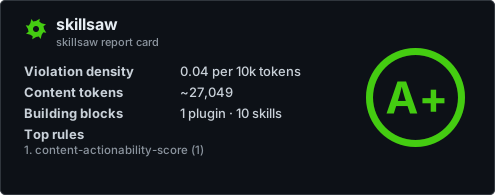
skillsaw badge writes .skillsaw-badge.json (a shields.io endpoint
payload) and prints ready-to-paste README markdown. Add --large to also
render .skillsaw-card.svg — a self-contained SVG card with the repository
name and letter grade (--theme light|dark, default dark):
Regenerate both on pushes to your default branch and commit them when they change:
name: Badge

on:
  push:
    branches: [main]

permissions:
  contents: write

jobs:
  badge:
    runs-on: ubuntu-latest
    steps:
      - uses: actions/checkout@v5
      - run: pipx install skillsaw
      - run: skillsaw badge --large .  # grades, never gates (always exits 0)
      - name: Commit badge artifacts
        run: |
          git config user.name "github-actions[bot]"
          git config user.email "github-actions[bot]@users.noreply.github.com"
          git add .skillsaw-badge.json .skillsaw-card.svg
          git diff --cached --quiet || git commit -m "Update skillsaw badge"
          git push
Both images are served from your repository via
raw.githubusercontent.com. GitHub proxies README images through its
camo cache, which caches aggressively — a freshly regenerated badge or
card can appear stale for a while after pushing.
Other output formats
skillsaw supports several machine-readable output formats — --format
(stdout) and --output (file) accept text, json, sarif, html,
code-climate, and gitlab — including SARIF
2.1.0 for tools that ingest it.
See the CLI reference for details.
Committed generated docs
Deprecated in 0.20.0
skillsaw docs is deprecated and will be removed in an upcoming release.
Existing CI jobs can keep using it during the deprecation period.
Some repositories commit the output of skillsaw docs and gate CI on it
being current — regenerating in CI and failing if the working tree changed.
Upgrading skillsaw can change that output, so plan on regenerating and
committing the result as part of a version bump.
GitLab CI
For GitLab merge-request widgets, use the gitlab output format (a Code
Quality report, available since skillsaw 0.11.3):